# Iceberg
## 1. Iceberg Overview
#### What Is Iceberg
Iceberg in FINTER refers to a *read-only analytical data layer* that mirrors specific service or operational databases.
It stores data as Parquet-based tables in AWS and allows users to query large-scale datasets directly through SQL (via QuandaIceberg).
Unlike SM (Source Model), which stores simple CSV/JSON files, Iceberg is structured, scalable, and supports real-time research use without impacting production systems.
***
#### Why Iceberg Exists
Originally, most datasets were managed as SM (Source Model) — flat CSV files stored in S3 and accessed through QuandaData.
However, this structure faced several limitations:
| Limitation | Description |
| ------------------- | ------------------------------------------------------------------------------------------------------------ |
| Scalability | SM was file-based, not database-based, making it inefficient for multi-year, multi-entity queries. |
| Performance | Loading CSVs for full universes or long periods caused memory and latency issues (millions of rows). |
| Consistency | SM had no schema registry, so metadata and field alignment had to be manually tracked. |
| Dependency Tracking | Model dependencies were only managed for CM. SM and other file types could not trigger model recalculations. |
To solve these issues, the Iceberg layer was introduced.
***
#### How It Works
Iceberg acts as a middle layer between Service DB and CM:
| Layer | Description | Primary Use |
| ------------------ | -------------------------------------------------------------------------------------- | --------------------------------------------------- |
| Service DB | Real-time operational database used by live products and monitoring systems. | Live application data. |
| Iceberg | Read-only replica of selected Service DB tables, stored as Parquet files in AWS. | Research and analysis without risking service load. |
| CM (Content Model) | Fully validated, versioned, model-ready dataset stored in S3 with dependency tracking. | Official alpha / portfolio model input. |
Internally, Iceberg tables are also registered in AWS Glue, which maintains automatic metadata (schema, column info).
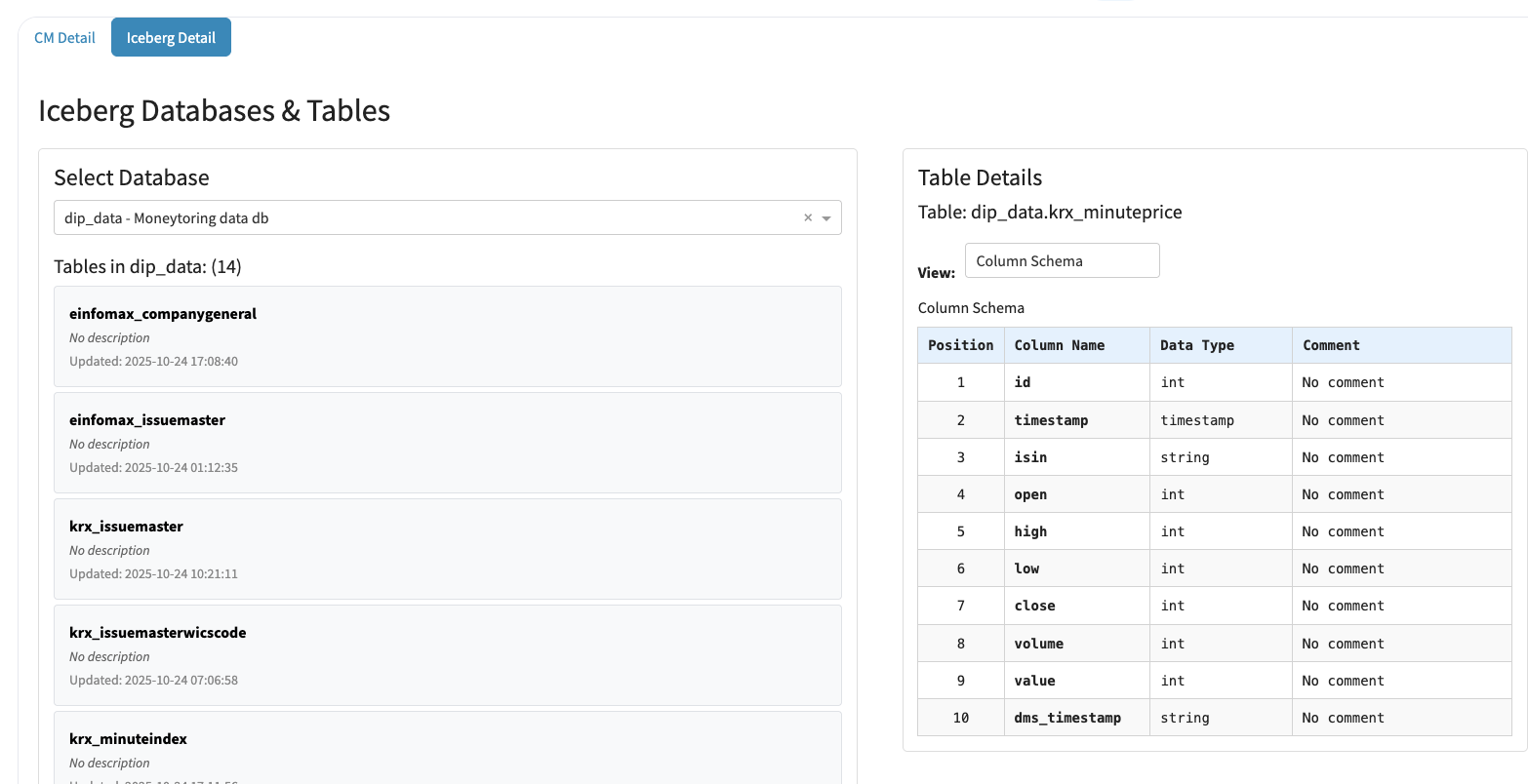
Users can explore all Iceberg databases and tables from the [Finter Studio → Datasets → Iceberg Detail](https://finter.quantit.io/studio/ingredients/datasets) dashboard.
***
#### Typical Use Cases
| Use Case | Example |
| ------------------------------------ | --------------------------------------------------------------------------------------------------------------------------------------------------- |
| Research Access to Service Data | Analysts can safely query monitoring DB data (e.g., minute prices, news feeds) without touching the live DB. |
| Large-Scale Financial Data Retrieval | Financial statement tables like fnguide\_ai.tf\_cmp\_findata\_ifrs or compustat\_us.co\_ifndq can be queried for any fiscal period with simple SQL. |
| Cross-Team Data Sharing | Teams (e.g., Monitoring, Qore, SKT) can use the same Iceberg tables without duplicating CSV files. |
| CM Pipeline Input | Iceberg provides a consistent, schema-safe data source that can be easily validated and versioned into CM. |
Example code:
```
from finter.data import QuandaIceberg
db_engine = QuandaIceberg()
# List columns in a table
col_list = db_engine.columns("fnguide_ai", "tf_cmp_findata_ifrs")
# Query specific data
df = db_engine.query("""
SELECT cmp_cd, reva, niq, yymm
FROM fnguide_ai.tf_cmp_findata_ifrs
WHERE yymm = '202506'
""")
```
***
#### Iceberg vs. SM
| Feature | SM (Source Model) | Iceberg |
| ------------------- | --------------------------------------- | ------------------------------------------- |
| Storage Type | CSV or JSON files on S3 | Parquet tables (SQL queryable) |
| Access Method | QuandaData (file loading) | QuandaIceberg (SQL querying) |
| Schema Management | Manual / external | Automatic via AWS Glue |
| Performance | Slower, memory-heavy for large datasets | Optimized for large-scale parallel queries |
| Dependency Tracking | Not linked to model triggers | CM-compatible input source |
| Use Case | Simple or lightweight data access | Large-scale research or production datasets |
***
#### Practical Examples from FINTER
* KRX Minute Data: Monitoring system data (krx\_minuteprice, krx\_minuteindex) is mirrored as Iceberg tables for safe researcher access.
* FnGuide Financial Data:
Previously stored only in SM (CSV); now accessible through Iceberg tables (tf\_cmp\_findata\_ifrs, tf\_cmp\_findata\_info) for both Korea and U.S. datasets.
* US Compustat Data:
Tables like compustat\_us.co\_ifndq, compustat\_us.co\_filedate can be queried directly without requiring ContentFactory downloads.
***
#### Benefits
For Researchers
* Query massive datasets directly (millions of rows).
* Consistent SQL interface across all data sources.
* No need for separate DB credentials or schema management.
For Model Developers
* Can directly use Iceberg as a pre-CM input source.
* Easy transition from Iceberg → CM via validation pipeline.
For Production Systems
* Removes research load from live DBs.
* Enables reproducible pipelines and data recovery.
***
#### Summary
> Iceberg is the bridge between production databases and model-ready datasets.
> It ensures consistent, scalable, and research-safe access to critical data, allowing researchers and model developers to query and process large datasets without risking operational stability.
***
## 2. Accessing Iceberg Databases & Tables
You can explore all available Iceberg datasets directly from the FINTER Studio interface.
#### How to Access
1. Go to [finter.quantit.io](https://finter.quantit.io)
2. Click the Studio menu on the top navigation bar
3. Select the Datasets tab
4. Click on the Iceberg Detail sub-tab
#### What You’ll See
* Database Selector
Choose from the list of registered Iceberg databases (e.g., dip\_data – Monitoring data DB).
* Table List
Displays all tables available in the selected database, including update timestamps.
* Table Schema Viewer
Selecting a table shows its full column schema on the right panel:
* Column names
* Data types
* Comments (if any)